
How to read your Codex weekly limit
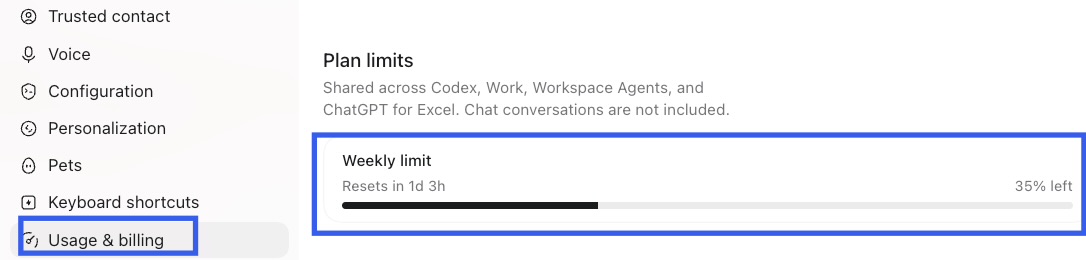
“35% left” means 35% of the displayed weekly allowance remains; it does not mean 35% has been used. “Resets in…” is the countdown Codex displays for that limit. Check your own current account for the authoritative values and labels.
Weekly limit
This identifies the allowance being shown. Codex can show different usage information depending on the account, workspace, plan, and available features.
Remaining percentage
Read the wording beside the percentage. A value marked “left” is remaining allowance, not a promise of a fixed number of messages, tasks, or hours of work.
Reset countdown
When Codex exposes reliable reset information, the countdown tells you when the displayed limit is due to renew. It is specific to the account state shown.
When does Codex usage reset?
Use the reset countdown shown beside your relevant limit. Do not infer a universal weekday, midnight reset, UTC time, or shared schedule from another account’s display. The screenshot’s “1d 3h” is a captured countdown, not the length of a weekly cycle.
Why your allowance may differ
Available limits, reset information, and options can differ by account, workspace, plan, region, and product availability. OpenAI can also change how usage is presented, so this page does not publish a fixed plan-limit table or treat historical allowances as permanent.
Where to check your current usage and reset
In Codex Desktop, open Settings and select Usage & billing, then review the relevant Plan limits information. For the short native walkthrough, see How to Check Codex Usage.
What happens when you reach the limit?
If Codex has already stopped accepting new work, see what happens when you reach a Codex limit—and what to do next.
Keep your Codex usage visible on Mac
QuoPeek is an optional Mac menu-bar utility for keeping Codex usage visible, with manual refresh and supported automatic refresh. It displays reset timing only when reliable reset information is exposed; it does not change your limits or reset timing.
Download QuoPeek Free
Start with menu-bar usage display, manual refresh, and automatic refresh. Pro is optional.
Download QuoPeek FreeRequires an Apple silicon Mac with macOS 13 or later, Codex Desktop, and macOS Accessibility permission for visible UI reading. This is a Mac download, not an iPhone app.
Frequently asked questions
Does “35% left” mean remaining or used?
It means 35% remaining when the display says “left.” Read the label shown in your account.
Does everyone’s weekly limit reset at the same time?
Do not assume so. Use the reset information shown for your own relevant limit.
Are remaining usage and credits the same thing?
No. Remaining usage describes the allowance shown by that limit. Credits, where offered, are a separate balance and follow their own terms.
Where can I check my current reset information?
Open Codex Desktop Settings → Usage & billing and review the reset information displayed beside the applicable limit.